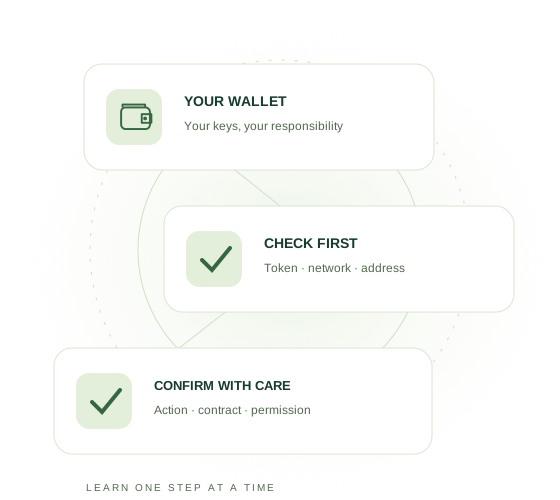
Send
Send digital assets to a service or platform.
INDEPENDENT · PRACTICAL · SAFETY FIRST
From your first wallet to an informed transaction. Learn what you see, what you approve and how to stay in control, one step at a time.
28 chapters · 3 languages · 3 quiz levels
WELCOME TO WEB3
Digital assets and applications bring new possibilities and responsibilities. This independent guide helps you understand the basics and practise safely, without requiring any particular platform.
After this guide, you will know:
Remember: “Every expert was once a beginner.” Take your time. Understand each step. That is the safest way to get started with Web3.
Because the financial world is changing
Web3 is an umbrella term for applications that use blockchains, digital assets and wallets. A wallet lets you sign actions. With a self-custody wallet, you control the keys and take responsibility for protecting them.

You can apply the same fundamentals across different wallets and applications. Always check what an application does, the risks involved and the permission you grant.
Send digital assets to a service or platform.
Receive payouts directly in your own wallet.
Decide for yourself which transaction you confirm.
Access a Web3 service through your wallet.
You decide which actions you approve.
Transactions can be checked on the blockchain.
Fewer intermediate steps can speed up transactions.
Web3 is the foundation for digital financial applications.

Sometimes you use the wallet only to send or receive. Other services may also require you to approve a transaction or smart contract.
Remember: “Web3 does not change what you want to achieve.”It mainly changes how digital transactions are carried out.
From bank to wallet and back
Your money is not always in the same place. Once you understand the route, everything else becomes much easier.

Step 1
You send money from your bank account to a reliable crypto exchange. Check that both accounts are in the same name.

Step 2
An exchange is a digital currency exchange. For example, you can convert euros into a stablecoin such as USDC or USDT. Which asset is available or suitable depends on your exchange, region and the service you use.
As long as your stablecoin remains on the exchange, it is managed by the exchange.

Step 3
When you send a stablecoin to your own wallet, it comes under your own control. From that moment, you are responsible for its security.

Step 4
Depending on the service, you send digital assets or use your wallet to approve a transaction.
↔Step 5
A payout can arrive back in your wallet. You decide what to do next.
A token name is not enough: verify the issuer and contract address on the selected network. Native and bridged stablecoins can carry different risks. Stablecoins can lose their peg.
Why do we mainly use USDC in this guide?
USDC and USDT are both stablecoins designed to maintain approximately the same value as the US dollar. However, they are two different digital assets.
Within the European Economic Area, regulated providers mainly use stablecoins that can be offered under MiCA rules. That is why USDC remains the main example in this guide.
Outside Europe, USDT is also widely used. Which stablecoin you can use depends on your region, exchange, wallet, blockchain network and the Web3 service involved.
Remember: “Your money does not always follow the same route.”It can move between your bank, exchange, wallet and platform.
Your personal digital key
A Web3 wallet gives you access to digital assets and Web3 services.
 →
→ same idea→
The key is not your house. The key gives you access to your house.
A wallet works in the same way. The wallet is not the blockchain, but it gives you access to your digital assets and transactions on the blockchain.
Receive digital assets at your wallet address.
Send digital assets to another address.
Check and confirm transactions yourself.
Connect your wallet to a Web3 service.
No. A bank manages your account. With a Web3 wallet, you decide which transactions you carry out and approve.
No. Sometimes you hold digital assets through your wallet. Sometimes you only use the wallet to send, receive or approve something.
Remember: “Think of your wallet as your personal digital key to Web3.”
Wallet app versus blockchain
Your digital assets are not literally stored in the app. The wallet gives you access to what is recorded on the blockchain.
Shows information and allows you to carry out transactions.
Records digital assets, addresses and transactions.
No. It depends on the service. Sometimes digital assets are directly under your control. Sometimes you only use the wallet to send, receive, connect or approve.

This does not automatically mean your assets have disappeared.
Remember: “Your wallet gives you access to what is recorded on the blockchain.”
A personal choice
Most wallets perform the same basic functions. Choose a wallet that you understand and can learn to use safely.
An app on your smartphone or computer. Convenient for daily use.
A separate device or card system that provides additional protection for your digital keys.
 UnstoppableOfficial website
 SafePalOfficial website
 MetaMaskOfficial website
 Trust WalletOfficial website
 TangemOfficial website
Always check that your wallet, network and chosen service are compatible. Download only from an official source.
Remember: “The best wallet is the wallet you understand and learn to use safely.”
Go deeper for Level 3
A hardware wallet keeps private keys outside the normal computer environment. It does not automatically determine whether every permission benefits you. Check the details on the device and understand the request. A valid malicious approval can expose tokens without revealing your recovery phrase.
Sources and further reading: MetaMask: hardware & signatures
Start Level 3 →Take your time
Installation is usually simple. Security deserves the most attention.
Use the official App Store, Google Play Store or the wallet provider’s official website. Do not simply click advertisements or links in messages.
Choose Create a new wallet. Use Restore or Import only if you already have a wallet and know exactly what you are doing.
Use a strong access code, fingerprint, facial recognition and automatic locking.
Remember: “Download your wallet only from an official source and secure it immediately.”
The backup key to your wallet
Your recovery words allow you to reopen your wallet on another device.
You use them if your phone breaks, is lost, is replaced or if you need to reinstall the wallet.
Anyone who has your recovery words may be able to access your wallet.
Assume that your wallet is no longer secure. Create a new wallet as soon as possible and move your digital assets to the new wallet address.
Remember: “Never share your recovery words with anyone.”
Go deeper for Level 3
A 2-of-3 multisig requires two different authorized keys. Its protection is weakened if all keys share the same vulnerability. Separating devices, storage and, where appropriate, operators reduces the chance that one incident compromises enough keys to authorize a transaction.
Sources and further reading: Ethereum: smart contract security
Start Level 3 →Public for receiving
A wallet address can be compared to a bank account number.
YES
You may share your wallet address when someone wants to send you digital assets. Your recovery words must always remain secret.
Example
0x1234A9cB…7eF2ABCDAlways copy it. Never type it manually.Use the copy button or QR code.
Compare the first and last characters.
The address and network must match.
Compare the full address with a trusted source. Do not copy an address solely from recent transaction history: address poisoning can introduce a lookalike address. Stop if you cannot verify the destination.
Remember: “Your wallet address is public. Your recovery words are secret.”
Go deeper for Level 3
In address poisoning, an attacker places a similar-looking address in your transaction history, for example through a small or zero-value transfer. Matching first and last characters do not prove identity. Compare the full recipient address with a trusted source; do not blindly copy from history.
Sources and further reading: MetaMask: address poisoning
Start Level 3 →The correct route for your transaction
Stablecoins such as USDC and USDT can exist on different blockchain networks.
Think of the network as the route along which your digital package is sent.
The sender and receiver must use the same network. If you use the wrong network, your assets may be difficult or sometimes impossible to recover.
Check not only the network, but also the exact asset. USDC on BNB Smart Chain is not the same token as USDT on BNB Smart Chain.
If you are unsure, send a small test amount first.
Remember: “Both the address and the network must be correct.”
When the token or network does not match
You may already have crypto, but not the right token or not on the right network. That is where swaps and bridges come in.
With a swap, you exchange one token for another. Example: you have USDT on BNB Smart Chain and need USDC on BNB Smart Chain. When a suitable route is available, you can swap USDT for USDC. The token changes; the network stays the same.
With a bridge, you move assets from one blockchain network to another. Example: you have USDC on Ethereum and need USDC on BNB Smart Chain. You then need a supported cross-chain route.
MetaMask can now also offer cross-chain transfers through the same Swap flow. Always check both the source and destination token and network.
If your USDC is already on the correct network, no swap or bridge is needed.
If you need USDC on BNB, you can swap USDT for USDC when a suitable route is available.
If you need USDC on BNB, use a supported bridge/cross-chain route. Simply switching networks in MetaMask does not move your tokens.
If you can buy the correct token on the correct network from the start, you avoid an extra swap or bridge.
An Approve step can be a separate smart-contract permission before the actual swap or bridge. Read every confirmation separately. On BNB Smart Chain, you need BNB whenever the action requires a gas fee.
Many EVM networks use addresses that look the same. That does not mean your tokens automatically move to another network. Always choose a route that supports the source token, source network, destination token and destination network.
A bridge uses additional infrastructure or smart contracts. Check the provider, token variant, destination network, route, waiting time and total fees. Switching networks in your wallet does not move tokens.
Remember: “Token changes? Think swap. Network changes? Think bridge.”Always check the exact token, network, approval and costs before confirming.
Go deeper for Level 3
A native token and a bridged representation can have different contracts and risks. Some bridges hold the original token and issue a representation; other routes burn and mint native tokens. Check the actual route, backing, token variant and options for moving back.
Price impact is the effect of your own order on available liquidity. Slippage is the difference between the quoted and executed outcome. A low slippage setting does not make a poor quote attractive. Assess price impact, minimum received, liquidity and fees separately.
An allowed 1% decrease from 1,000 tokens gives a floor of 1,000 × 0.99 = 990 tokens. Actual receipt can be higher. A correctly enforced minimum prevents execution below that floor but does not guarantee the transaction succeeds. Always check the explicit minimum shown in your wallet.
Raising slippage does not fix every failure. It increases the price deterioration you accept. In a sandwich attack, an attacker trades before and after your swap to profit from the price movement. First check the failure, liquidity and route; assess MEV protection where available (MEV is value extracted through transaction ordering).
A stablecoin targets a value; its market price can diverge from that target (a depeg). Examine backing, liquidity, issuer and redemption terms. Direct redemption may have eligibility requirements or restrictions. A discount to target is not guaranteed profit: recovery and actual redemption are uncertain.
Sources and further reading: Uniswap: price impact · Ethereum: MEV · Circle: bridged USDC
Start Level 3 →Withdraw a stablecoin from an exchange
Follow each step calmly and check the network before confirming.
Copy the wallet address where you want to receive the required stablecoin.
Choose Withdraw or Withdrawal.
Choose exactly the same asset and network as required by the receiving wallet or service.
Wallet address, asset, network and amount.
After the network has processed the transaction, the stablecoin appears in your wallet.
Send a small test amount first. Check that it arrives before sending the rest.
Remember: “Always check the wallet address and network first.”
Connect Wallet
Connecting allows the website to recognise your wallet address and present actions to your wallet.
The service can recognise your wallet address. Connecting by itself does not automatically send digital assets.
Other actions may require a separate signature, approval or transaction.
Confirm only actions you understand and want to carry out. If you are unsure, do not confirm.
Remember: “Connecting is not the same as paying. Read every separate approval carefully.”
TRANSACTION CHECK
Sending a token and using a smart contract are different actions. First establish what kind of action you intend to perform.
Are you sending tokens to an address, making a swap or using a contract? Verify the official destination and understand what the action does.
Verify the token and contract address, network, recipient, amount and fees. For a new address, verify the details first, then send a small test before the remainder.
A regular token transfer normally needs no token approval. If a contract requires one, check the spender and limit the allowance to what you need.
Sign only the intended action. Check its TXID on the correct block explorer and confirm that the expected outcome occurred.
A confirmed transaction is usually final. A successful approval does not prove the main action took place. A failed transaction can still cost gas.
Stop if an address, network or request is unexpected. More confirmations do not make an action safer.
Go deeper for Level 3
A simulation estimates outcomes under particular conditions; alerts may identify known risks. No warning is not a guarantee. Detection may be incomplete and blockchain state can change before execution. Continue checking the purpose, address, contract, amount and permissions yourself.
Sources and further reading: MetaMask: security alerts
Start Level 3 →Directly to your own wallet
A payment or transfer can arrive directly at your wallet address. Receiving normally requires no approval or payment to release tokens.
The correct receiving address.
The network on which the asset is sent.
The paid-out stablecoin, for example USDC or USDT, must be visible on the correct network.
This does not automatically mean something is wrong.
Remember: “First check the network, wallet address and status on the blockchain.”
Check what actually happened
Can you not see a payment or payout yet? Use the transaction hash to check its status directly on the blockchain.

The transaction hash, also called a TXID or Txn Hash, is the unique identifier of a blockchain transaction.
Example: 0x9abc...bddfb
You can usually find it in the transaction history of your wallet, exchange or platform.
Open the relevant transaction and copy its transaction hash.
Use the block explorer for exactly the same network.
Paste the TXID into the explorer's search bar.
Status, sender, recipient, token, amount and network must all be correct.
Wait and check again. Do not blindly send the same transaction again.
The transaction has been processed. If the token is not visible, check the network and token display.
The transfer was not completed. Investigate the cause before trying again.
Remember: “Your wallet app may refresh later. The block explorer shows the status on the blockchain.”
Go deeper for Level 3
A cross-chain transfer can involve several steps, separate confirmations, processing and sometimes a claim. Success on the source network does not prove receipt is complete. Check the bridge status, both explorers, the recipient address and token variant before sending again.
Sources and further reading: Ethereum: bridges
Start Level 3 →Send a stablecoin back to sell it
Always copy the exchange deposit address and choose exactly the same network.
Choose Deposit.
Choose exactly the same asset and network as in your wallet and copy the deposit address.
Choose Send and paste the address.
Address, network, amount and network fees.
Your wallet usually needs a small amount of the network’s native asset, such as BNB or ETH, to pay the gas fees.
Remember: “The network on the exchange and in your wallet must be exactly the same.”
Back to traditional money
Is your stablecoin on the exchange? If the exchange supports it, you can sell it and have the proceeds paid to your bank account.
→Convert the stablecoin into euros or another available currency.
Select your bank account and enter the amount.
Check the name, bank details and fees.
Processing time differs by exchange and bank. Check that your exchange account and bank account are in the same name.
Remember: “Always check the name, bank details and fees before confirming.”
Trust and time pressure are weapons
Scammers sometimes pretend to be support, a leader or a well-known company.
Do not click anything and do not approve anything. Use only official websites, apps and support channels.
Remember: “Genuine support will never ask for your recovery words.”
Giving permission for an action
An approval can grant important permissions. Always read what you are confirming.
The site sees your public address and can send requests. Connecting alone does not grant permission to spend tokens.
You allow a specific contract (the spender) to use a particular token up to an allowance.
You sign a message. Even an off-chain signature can grant rights, for example through a permit. Read the request; a signature without gas is not automatically safe.
You sign a blockchain action such as a transfer, swap or contract interaction. Check the network, destination, amount and fees.
An allowance is the maximum amount of a token the spender may use. An unlimited allowance can also expose tokens received later. Choose a limited amount where possible and revoke unwanted permission. This does not revoke other approvals or undo past transactions.
Learn more about approvals ↗Connect to a service
Use a stablecoin for a transaction
Send an amount
Activate a smart contract
An approval is not the same as sharing recovery words, but it can give access to a specific token or action.
Remember: “Always read what you approve. Not sure? Cancel and check first.”
Go deeper for Level 3
An off-chain signature can grant a token permission (permit). Another party may submit it on-chain later, subject to its conditions. Check the domain, network, token, spender (the party receiving permission), amount and expiry. No gas fee does not mean no financial consequences.
For ERC-721, setApprovalForAll authorizes an operator within one collection contract. It is broader than approval for one token ID: it also covers NFTs acquired later in that contract while active. It does not automatically cover other collections. Check the operator and the scope.
An audit assesses a particular scope and version at a particular time; it is not a safety guarantee. Authorized parties can change how upgradeable contracts work. Check the current implementation, unresolved findings, administrative powers and any delay before upgrades take effect.
An oracle supplies external data, such as market prices, to smart contracts. Correct code can produce wrong outcomes when given faulty inputs. Assess the price source, freshness, resistance to manipulation and emergency controls. Reliable calculations also require reliable data.
Sources and further reading: ERC-721 · Ethereum: smart contract security
Start Level 3 →Clean up access after use
Disconnecting a wallet and revoking a token approval are two different actions.

The website no longer sees your wallet as actively connected. Existing token approvals may still remain active.
You end the on-chain permission that allowed a smart contract to use a specific token.
Approval checker
Use only the official domain. Connect your wallet, select the correct network, inspect the approvals and revoke only unwanted access.
Revoke.cash is preventative. It cannot recover stolen assets.
Remember: “Disconnecting ends the connection. Revoking ends the token approval.”
Act quickly, but do not rush
The correct response depends on what may have been exposed: an approval, your device or your recovery phrase.

Stop confirming transactions, disconnect the site, review approvals and revoke suspicious permissions.
Treat the wallet as compromised. Create a completely new wallet and discontinue the old recovery phrase.
Do not keep sending extra gas tokens to the same wallet. An automated sweeper may be active. Stop, collect the evidence and seek specialised help before taking further action.
Remember: “If your recovery phrase was exposed, only a completely new wallet is safe.”
Rushing causes mistakes
Most mistakes can be prevented with one extra check.
Remember: “Rushing and Web3 are not a good combination.”
Keep this list
Checking calmly is always faster than fixing a mistake.
Remember: “Checking calmly is always faster than fixing a mistake.”
Keep this on your phone
Open this checklist before confirming an important transaction.
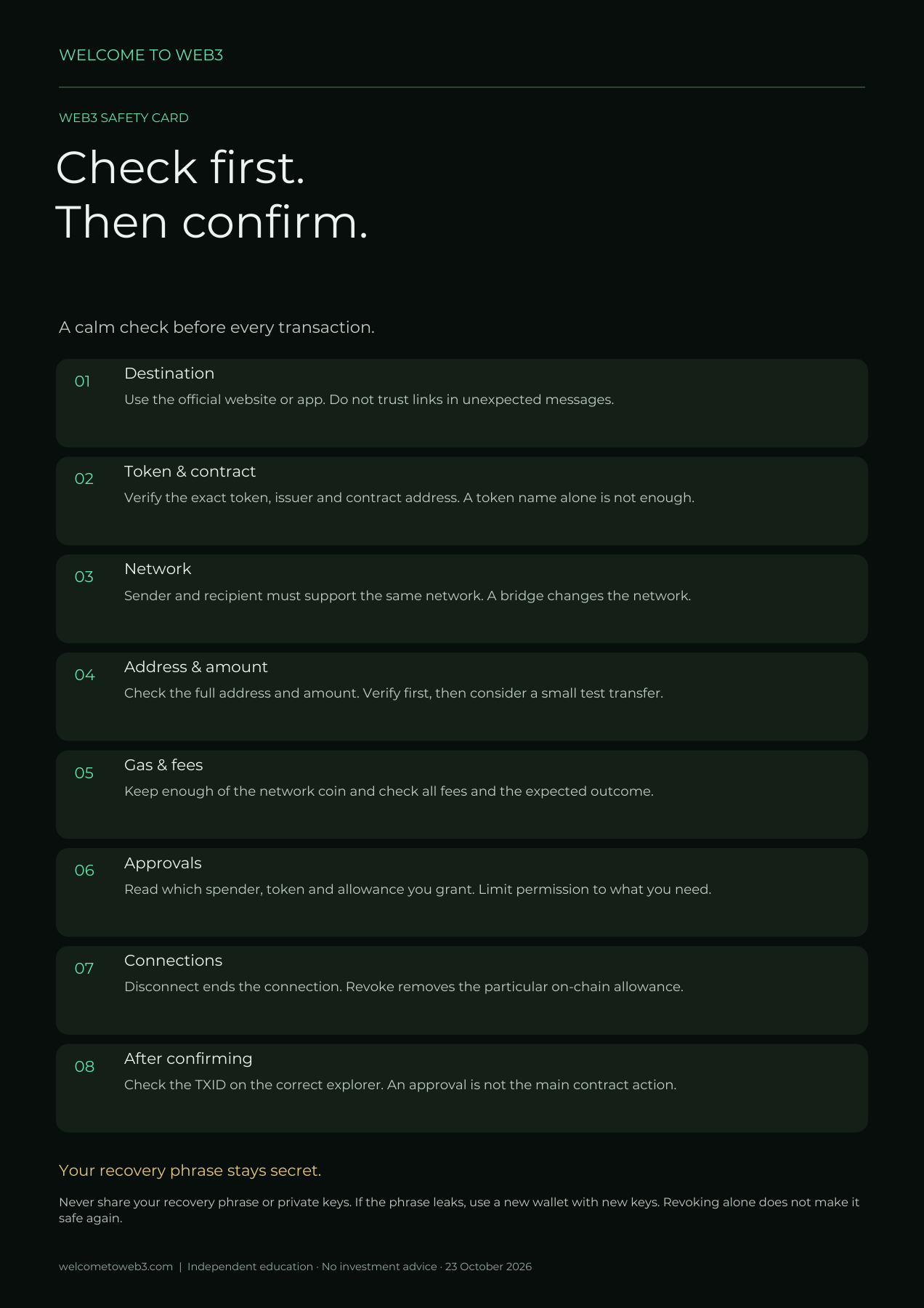
Remember: “Thirty seconds of checking can prevent an irreversible mistake.”
Click a question
You do not need to remember everything. Look it up again calmly whenever you are unsure.
No. You may share your wallet address to receive digital assets. Remember that transactions on public blockchains may be visible.
Your recovery words allow you to reopen your wallet on another device.
Check whether you selected the correct asset, whether you are viewing the correct network, whether the token has been added to the display and whether the transaction has already been processed.
Usually not. A confirmed blockchain transaction is generally final.
That asset is used to pay the network fees or gas fees.
Do not confirm anything. Check first or ask for help through an official channel.
No. USDC and USDT are different tokens. Always use the exact asset and network requested by the receiving wallet, exchange or service.
Remember: “Stop if you are unsure.”Checking before confirming is always the safest choice.
Quickly look something up
Type a word or browse the terms.
A digital network on which transactions are recorded.
Your personal access to digital assets and Web3 services.
The address you use to receive digital assets.
The secret words that allow you to reopen your wallet.
A platform where you can buy, sell or exchange digital assets.
A digital asset designed to maintain a relatively stable value, often linked to a traditional currency such as the US dollar.
A stablecoin linked to the US dollar that is available in the European Economic Area under a MiCA issuance structure.
A widely used global stablecoin linked to the US dollar. Availability and support can differ by region, exchange and service.
The blockchain on which a transaction is carried out.
The fee required to process a transaction. Also called gas fees.
A digital asset that exists on a blockchain network.
A digital program that automatically carries out certain actions.
Permission you give through your wallet for a specific action.
The function used to connect your wallet to a Web3 service.
Sending, receiving or approving digital assets.
Exchanging one token for another. In a regular swap, the blockchain network stays the same.
A method for moving assets from one blockchain network to another.
A website used to inspect transactions, addresses and smart contracts on a blockchain.
The unique identifier used to look up a blockchain transaction.
The on-chain cancellation of a token approval that was granted earlier.
The maximum token amount a specific contract may use on behalf of your address. An allowance can remain after you disconnect the website.
An off-chain signature can grant a token permission (permit). Another party may submit it on-chain later, subject to its conditions. Check the domain, network, token, spender (the party receiving permission), amount and expiry. No gas fee does not mean no financial consequences.
Open the chapter →A hardware wallet keeps private keys outside the normal computer environment. It does not automatically determine whether every permission benefits you. Check the details on the device and understand the request. A valid malicious approval can expose tokens without revealing your recovery phrase.
Open the chapter →In address poisoning, an attacker places a similar-looking address in your transaction history, for example through a small or zero-value transfer. Matching first and last characters do not prove identity. Compare the full recipient address with a trusted source; do not blindly copy from history.
Open the chapter →For ERC-721, setApprovalForAll authorizes an operator within one collection contract. It is broader than approval for one token ID: it also covers NFTs acquired later in that contract while active. It does not automatically cover other collections. Check the operator and the scope.
Open the chapter →An audit assesses a particular scope and version at a particular time; it is not a safety guarantee. Authorized parties can change how upgradeable contracts work. Check the current implementation, unresolved findings, administrative powers and any delay before upgrades take effect.
Open the chapter →A 2-of-3 multisig requires two different authorized keys. Its protection is weakened if all keys share the same vulnerability. Separating devices, storage and, where appropriate, operators reduces the chance that one incident compromises enough keys to authorize a transaction.
Open the chapter →A native token and a bridged representation can have different contracts and risks. Some bridges hold the original token and issue a representation; other routes burn and mint native tokens. Check the actual route, backing, token variant and options for moving back.
Open the chapter →A cross-chain transfer can involve several steps, separate confirmations, processing and sometimes a claim. Success on the source network does not prove receipt is complete. Check the bridge status, both explorers, the recipient address and token variant before sending again.
Open the chapter →Price impact is the effect of your own order on available liquidity. Slippage is the difference between the quoted and executed outcome. A low slippage setting does not make a poor quote attractive. Assess price impact, minimum received, liquidity and fees separately.
Open the chapter →An allowed 1% decrease from 1,000 tokens gives a floor of 1,000 × 0.99 = 990 tokens. Actual receipt can be higher. A correctly enforced minimum prevents execution below that floor but does not guarantee the transaction succeeds. Always check the explicit minimum shown in your wallet.
Open the chapter →Raising slippage does not fix every failure. It increases the price deterioration you accept. In a sandwich attack, an attacker trades before and after your swap to profit from the price movement. First check the failure, liquidity and route; assess MEV protection where available (MEV is value extracted through transaction ordering).
Open the chapter →Impermanent loss compares a pool position with separately holding the same original tokens. A position can rise in euros and still underperform. Here: €2,200 − €2,000 = €200 growth, but €2,200 − €2,500 = −€300 versus holding. Earned fees may partly or fully offset the difference, but this is not guaranteed.
Open the chapter →Health factor compares weighted collateral with debt. Initially: €10,000 × 0.8 ÷ €6,000 = 1.33. At €7,500 it becomes €7,500 × 0.8 ÷ €6,000 = 1. In protocols such as Aave, a position below 1 becomes eligible for liquidation. Price moves, growing debt and parameter changes can reduce the buffer; rules differ by protocol.
Open the chapter →An oracle supplies external data, such as market prices, to smart contracts. Correct code can produce wrong outcomes when given faulty inputs. Assess the price source, freshness, resistance to manipulation and emergency controls. Reliable calculations also require reliable data.
Open the chapter →APY is an annual percentage that assumes compounding; the displayed value may vary. Rewards paid in a token are not guaranteed euro returns. Investigate where income comes from, how long incentives last, whether rewards can be sold and what costs or lockups apply.
Open the chapter →A token unlock makes previously locked tokens available. If all 5 million join 10 million circulating tokens, circulating supply rises by 50%. This does not predict a 50% price drop: selling behavior, demand and liquidity matter. Unlocking does not necessarily create new tokens.
Open the chapter →A stablecoin targets a value; its market price can diverge from that target (a depeg). Examine backing, liquidity, issuer and redemption terms. Direct redemption may have eligibility requirements or restrictions. A discount to target is not guaranteed profit: recovery and actual redemption are uncertain.
Open the chapter →Using several platform names does not automatically diversify underlying risks. Platforms may rely on the same bridge, stablecoin, oracle or contract library. One failure can therefore affect multiple positions at once. Map shared dependencies as well as the amount held on each platform.
Open the chapter →A simulation estimates outcomes under particular conditions; alerts may identify known risks. No warning is not a guarantee. Detection may be incomplete and blockchain state can change before execution. Continue checking the purpose, address, contract, amount and permissions yourself.
Open the chapter →Ending value = number of tokens × price: 1,200 × €0.70 = €840. Return = (€840 − €1,000) ÷ €1,000 = −16%. Token count and price multiply: 1.20 × 0.70 = 0.84. More tokens do not automatically mean more purchasing power. Costs can reduce the net result further.
Open the chapter →No term found.
Remember: “You do not need to memorise every word.”
You have learned the basics
Use this guide whenever you are unsure and check each step calmly.
Test your knowledge and application
Level 1 tests what you know. Level 2 tests what you do with it.
Start with the basics or move to 20 practical situations involving wallets, tokens, networks, gas, smart contracts, approvals and revoke.
You have a strong foundation. Level 3 also explores dependencies, financial consequences and the limits of security tools.
Remember: “Web3 does not have to be difficult.”Working calmly, checking carefully and acting safely make all the difference.
LEVEL 3
Read the advanced sections in these chapters. Below you will find additional explanations about DeFi and returns.
Go deeper for Level 3
Impermanent loss compares a pool position with separately holding the same original tokens. A position can rise in euros and still underperform. Here: €2,200 − €2,000 = €200 growth, but €2,200 − €2,500 = −€300 versus holding. Earned fees may partly or fully offset the difference, but this is not guaranteed.
Health factor compares weighted collateral with debt. Initially: €10,000 × 0.8 ÷ €6,000 = 1.33. At €7,500 it becomes €7,500 × 0.8 ÷ €6,000 = 1. In protocols such as Aave, a position below 1 becomes eligible for liquidation. Price moves, growing debt and parameter changes can reduce the buffer; rules differ by protocol.
APY is an annual percentage that assumes compounding; the displayed value may vary. Rewards paid in a token are not guaranteed euro returns. Investigate where income comes from, how long incentives last, whether rewards can be sold and what costs or lockups apply.
A token unlock makes previously locked tokens available. If all 5 million join 10 million circulating tokens, circulating supply rises by 50%. This does not predict a 50% price drop: selling behavior, demand and liquidity matter. Unlocking does not necessarily create new tokens.
Using several platform names does not automatically diversify underlying risks. Platforms may rely on the same bridge, stablecoin, oracle or contract library. One failure can therefore affect multiple positions at once. Map shared dependencies as well as the amount held on each platform.
Ending value = number of tokens × price: 1,200 × €0.70 = €840. Return = (€840 − €1,000) ÷ €1,000 = −16%. Token count and price multiply: 1.20 × 0.70 = 0.84. More tokens do not automatically mean more purchasing power. Costs can reduce the net result further.
Sources and further reading: Uniswap: liquidity provider returns · Aave: liquidation
Start Level 3 →Web3 changes quickly. This date helps you assess how current the guide is.